Shopify subscription analytics: metrics and tab-by-tab guide
subZwallet analytics (Launch plan and up) shows MRR, churn, LTV, plan performance, cancellation reasons, failed-payment recovery (dunning), rewards and at-risk subscribers. Shopify's native reporting gives [three subscription views: active, new, and canceled over time](https://help.shopify.com/en/manual/products/purchase-options/subscriptions/shopify-subscriptions/analytics), but does not calculate MRR, churn rate or LTV.
Without these numbers you cannot tell whether churn is voluntary (customers cancelling) or involuntary (failed payments), or whether your retention work is paying off. This guide defines each metric, walks through each tab, and lists what to do when a number moves.
Subscription metrics: definitions
Opening the analytics dashboard
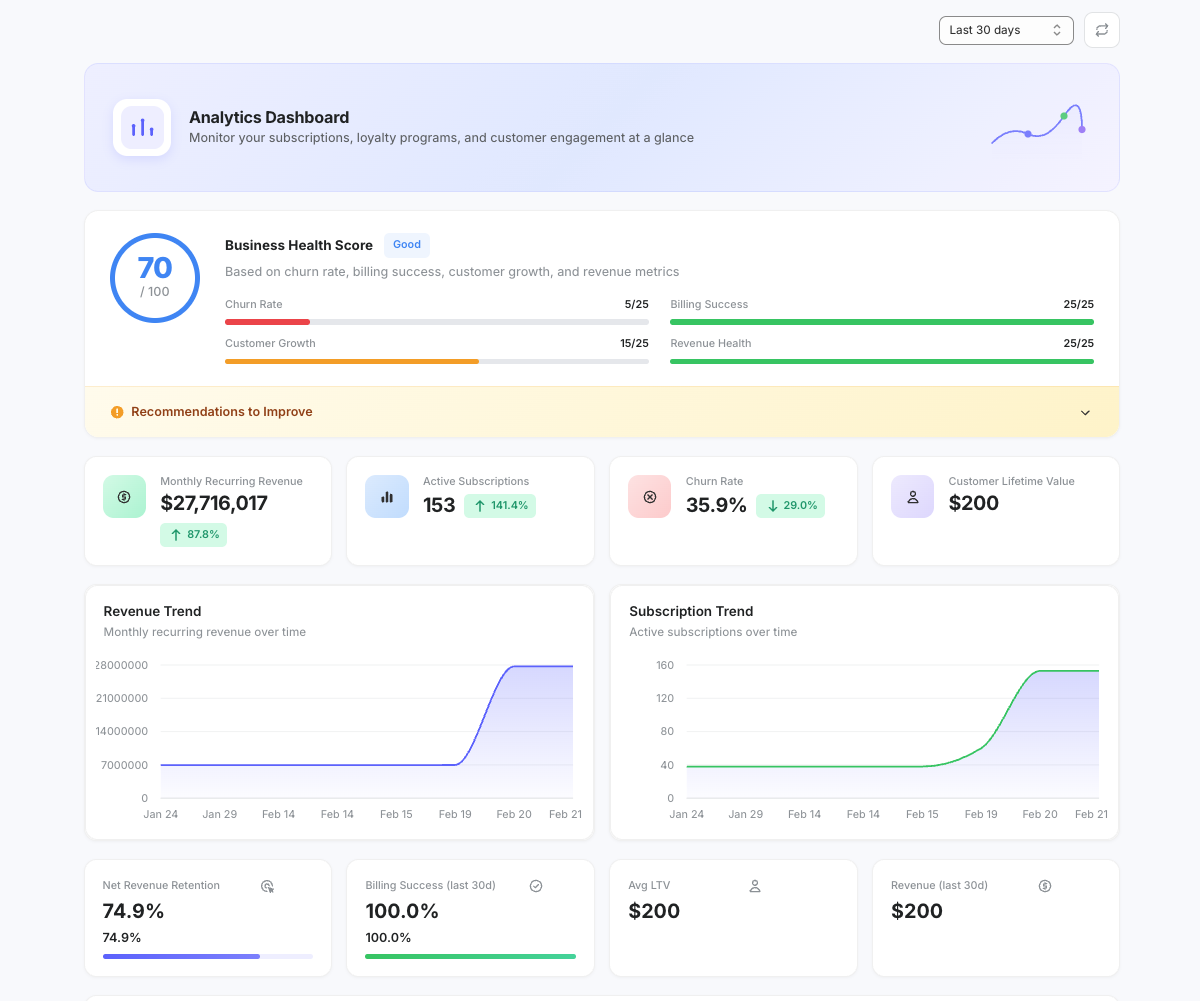
In the subZwallet sidebar, click Analytics. The tabs are Overview, Churn & retention, Plans, Cancellations, Dunning and Rewards. Use the period selector to switch between 30 days, 90 days and 12 months. Analytics is available on Launch, Growth, Scale and Enterprise.
Tab-by-tab walkthrough
The headline numbers: MRR, churn, LTV and active subscriptions for the period. Start here and open the matching tab when something moves.
How many subscriptions you lose over time and how long subscribers stay. Use it to separate voluntary churn from involuntary churn: a spike in cancellations without a spike in failed payments points to a product or experience problem, not a payment problem.
Which selling plans and cadences carry your subscriptions and revenue. Use it to see which offers customers actually choose and keep.
Cancellation reasons from your cancel flow and an at-risk view of subscriptions likely to churn. If one reason dominates (too much product, price, taste), add the matching treatment or retention offer to the cancel flow.
Failed payments and how many your retries recovered. If recovery drops, review your [dunning settings](/help/how-to-set-up-dunning) and the payment emails.
How your rewards program performs: points, milestone rewards and cashback issued and used. High issuance with little redemption means customers do not see enough value in the rewards. See the [Rewards guide](/help/rewards) for program design.
What to do when a metric moves
Recommended review cadence
- **Weekly (15 minutes):** walk through every tab and compare churn, MRR and recovery with the previous period.
- **Monthly (30 minutes):** review LTV and cancellation reasons and decide whether flows, rewards or dunning settings need changes.
- **Quarterly:** compare LTV with what you spend to acquire a subscriber. If acquisition costs outrun lifetime value, invest more in retention or tighten targeting.
Next steps
Analytics tells you where the problems are. The playbooks tell you how to fix them. If churn is the issue, start with the [subscription churn reduction playbook](/blog/reduce-shopify-subscription-churn). If billing failures are driving losses, see the [involuntary churn and dunning recovery playbook](/help/involuntary-churn-dunning-recovery-playbook). For day-to-day subscription operations, see [manage subscriptions](/help/manage-subscriptions).