Customer tiers: Build a VIP tier program on Shopify
Repeat customers are not all equal. Your top 5% of customers can generate 35% of total revenue, yet most Shopify stores treat every buyer identically after checkout. A tier program segments customers into named levels based on measurable behavior, then rewards the most valuable ones with escalating benefits that reinforce repeat purchasing.
Tiered loyalty programs deliver 1.8x higher ROI than flat programs, and 74% of consumers say VIP tiers influence where they shop. subZwallet provides the tier infrastructure that Shopify lacks natively: named levels, automatic assignment, per-tier multipliers, and Shopify tag integration. Available on Growth and Scale plans.
Why Shopify stores need a separate tier engine
Shopify offers customer segments that filter by tags, metafields, and purchase history. It does not provide named VIP levels, threshold-based promotion, or automatic benefit assignment. Shopify's predicted spend tier requires 100+ historical sales and uses machine learning rather than merchant-defined rules. For a store that wants Bronze, Silver, Gold, and VIP levels with clear thresholds and escalating perks, an app-level tier system is required.
subZwallet stores tier data as customer metafields, which are accessible across the Shopify ecosystem (Shopify docs: <a href="https://shopify.dev/docs/apps/build/metafields" target="_blank" rel="noopener">Customer metafields</a>). This means tier information syncs with Shopify segments (Shopify docs: <a href="https://help.shopify.com/en/manual/customers/customer-segmentation" target="_blank" rel="noopener">Customer segmentation</a>), email tools, and discount logic without duplicate data entry.
Where to find Customer Tiers
In the subZwallet sidebar, click Customer Tiers. The screen shows your tier program settings and the list of configured tiers.
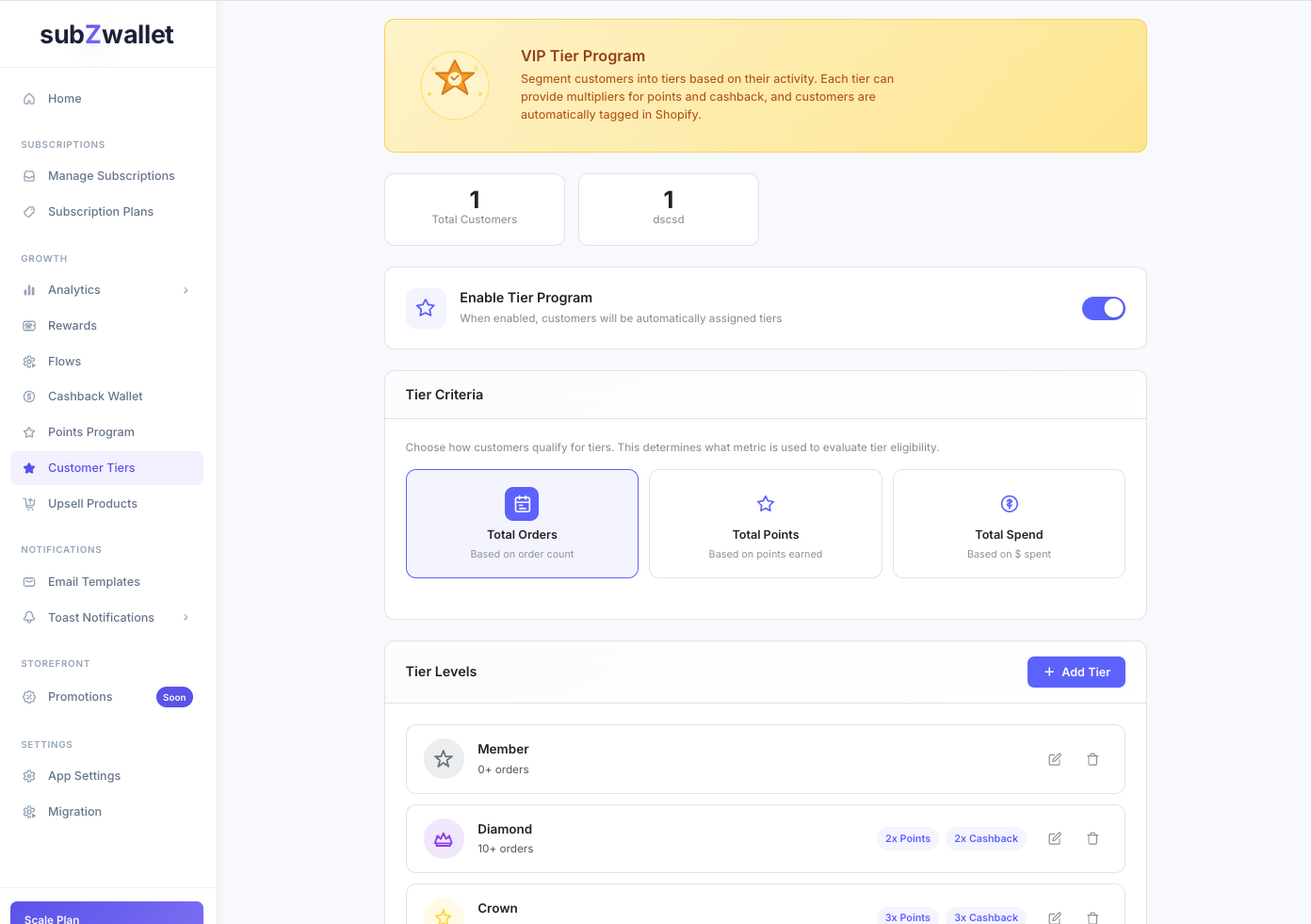
Example tier structure
Below is a starter structure used by DTC brands running spend-based programs. Adjust thresholds and benefits to match your margins and average order value.
Bronze acts as the default tier. Every customer starts there and progresses as they cross thresholds. Keeping the entry tier benefit-light creates a visible upgrade path that motivates second and third purchases.
Choosing the right criteria type
subZwallet supports three criteria types. Each changes what customer behavior drives tier progression.
You select one criteria type per program. If you switch criteria later, subZwallet re-evaluates all customers based on the new metric.
Step-by-step: Create a tier program
- Go to **Customer Tiers** and click Create or edit your tier program.
- Name the program (e.g., "Rewards Club") and write a short customer-facing description.
- Select criteria type: Orders, Points, or Spend.
- Add tiers in ascending order. For each tier, set the name, threshold value, color, icon, and badge text.
- Configure per-tier benefits: points multiplier, cashback multiplier, free shipping, early access, exclusive products, and any custom benefits in the benefits list.
- Enable **Auto-tag customers** and set the tag prefix (default: "tier"). This writes tags like tier:Gold to Shopify customer profiles.
- Set evaluation triggers: **Evaluate on order** (recalculate when an order is placed) and/or **Evaluate on points** (recalculate when points balance changes).
- Save the program. subZwallet evaluates existing customers and assigns tiers immediately.
How auto-tagging and evaluation work
When auto-tagging is enabled, subZwallet writes two things to each customer record: a Shopify customer tag (e.g., tier:Gold) and a customer metafield with full tier data. Tags make the customer filterable in Shopify admin, Klaviyo, and any tool that reads Shopify tags. Metafields store structured data (tier name, level, threshold met) for use in Liquid templates and headless storefronts.
Evaluation happens automatically when the configured trigger fires. If you enable "Evaluate on order," every completed order triggers a recalculation for that customer. If the customer's cumulative value crosses a higher threshold, they are promoted and re-tagged within seconds. Downgrade behavior depends on your program design; most brands choose not to downgrade and instead use tier expiration if needed.
Connecting tiers to points and cashback multipliers
Tier multipliers increase the earning rate for your points program and cashback wallet. A Gold-tier customer with a 2x points multiplier earns double the base rate on every qualifying action. This compounds over time: higher-tier customers accumulate rewards faster, which increases redemption frequency and repeat purchase rate.
Configure multipliers in the tier editor. For detailed setup, see the <a href="/shopify-loyalty-points-tiers">loyalty points and tiers integration guide</a>.
Example scenario: Supplement brand with spend-based tiers
A supplement brand with $65 AOV and 12,000 customers sets up four tiers: Bronze ($0), Silver ($200), Gold ($600), VIP ($1,500). Gold and VIP customers receive 1.5x and 2x cashback. The brand uses Shopify segments filtered by the tier:VIP tag to send early-access emails for new SKUs from its marketing tool, and compares reorder rates by tier each quarter to check the tiers are worth their cost. (Illustrative example.)
Next steps
If you are running a points program, connect tier multipliers to accelerate earning for top customers. See the <a href="/shopify-loyalty-points-tiers">loyalty points and tiers integration guide</a> for the full setup. For cashback configuration that works with tier multipliers, see the Cashback wallet article.