Points program for Shopify subscriptions
A points program turns every order into progress toward a reward, giving subscription customers a reason to stay beyond the product itself. Without one, the only thing keeping subscribers around is the product — and competitors sell products too.
Redeeming a reward gives customers a concrete reason to place the next order. subZwallet's Points Program lets you build that loop for both subscription and one-time orders on Shopify, with earning rules, redemption codes, optional point expiry and a birthday reward. It is included on every plan, including Free. Customers see their balance and rewards in the customer portal and in the rewards wallet page in their Shopify customer account.
Design your points economy before you build
Launching a points program without a plan leads to one of two failures: points are so easy to earn that margins collapse, or so hard to earn that nobody bothers redeeming. Start by deciding three numbers: the earning rate, the redemption ratio, and the first-reward threshold.
Example points economy table — A supplement brand with a $50 average order value (AOV) and 60-day subscription cycle:
With this setup, a subscriber earns $2.50 in reward value per order and hits their first redemption after two deliveries. That is a 5% effective rebate — within the recommended 3-10% earning range for subscription programs.
Where to find the Points Program dashboard
In the subZwallet sidebar, click Points Program. The dashboard shows Earning Rules, Redemptions, Birthday Reward, expiry settings, and a summary of points issued vs. redeemed. If few issued points are ever redeemed, your rewards are likely set too high. Read the benchmarks section below.
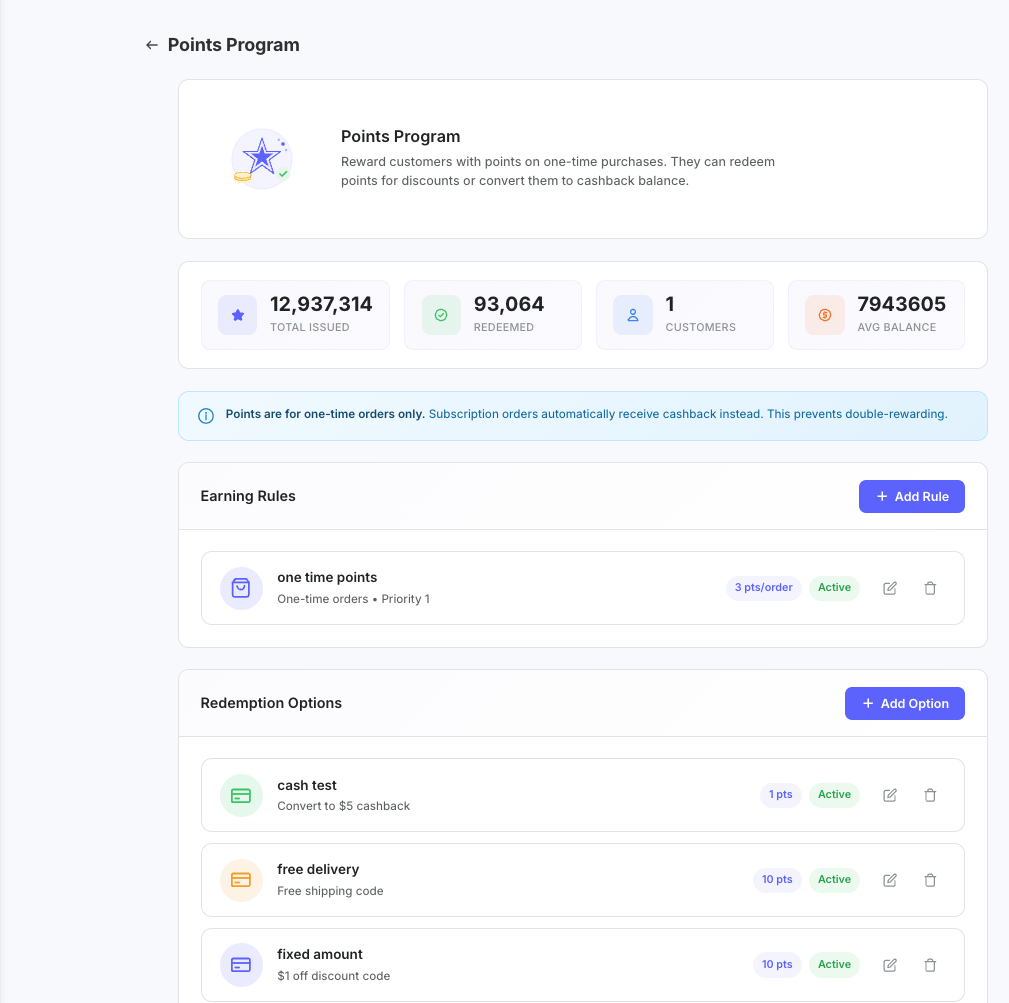
Earning rules: how customers accumulate points
Each earning rule defines a trigger, a points type, and optional conditions. You can stack multiple rules with AND/OR logic to create precise targeting.
Trigger determines which orders qualify: ONE_TIME (single purchases only), SUBSCRIPTION (recurring orders only), or ALL (both). Points type controls the math: FIXED awards a flat number of points per qualifying order, PER_DOLLAR awards points proportional to order value, and PERCENTAGE awards points as a percentage of the order total.
Conditions narrow the rule further. Available conditions include: order_minimum, order_maximum, order_contains_product, order_contains_collection, customer_tier, customer_tag, first_order, day_of_week, date_range, and subscription_order_number. Combine conditions with AND (all must match) or OR (any must match) logic.
Example: Award 2x points on subscription order #3 to reward customers who make it past the critical second-order churn window. Set trigger = SUBSCRIPTION, points type = PER_DOLLAR, value = 10, condition = subscription_order_number equals 3.
Redemption options: turning points into value
Redemptions define what customers can spend points on. Each redemption has a name, a points cost, and a reward type. When a customer redeems, subZwallet creates a redemption code they can use on their next order, or adds the value to their cashback wallet.
Reward types:
- **CONVERT_TO_CASHBACK** — Points convert to cashback balance in the customer's [wallet](/help/cashback-wallet) (the cashback wallet needs Growth or higher). Best for subscription businesses because it creates a rolling incentive to stay subscribed.
- **FREE_SHIPPING** — Generates a free shipping discount code. Set the points cost and code validity period.
- **PERCENTAGE** — Generates a percentage-off discount code (e.g., 10% off). Useful for encouraging larger one-time add-on orders.
- **FIXED** — Generates a fixed-amount discount code (e.g., $5 off). The most straightforward option and easiest for customers to understand.
Offer at least two redemption tiers — a low-cost option (e.g., 500 points for free shipping) and a higher-value option (e.g., 1,500 points for $15 cashback). Multiple tiers increase the likelihood that customers find a reward within reach, which directly improves your redemption rate.
How to set your points-to-currency ratio
The points-to-currency ratio is the single most important number in your program. It determines how much each point is worth in real money and directly controls your program's cost.
- **Start with your target rebate percentage.** Most subscription brands target 3-7% of order value back in rewards. Higher-margin products (beauty, supplements) can sustain 7-10%. Lower-margin products (food, beverages) should stay at 3-5%.
- **Set the ratio so customers can do the math.** Round numbers work: 100 pts = $1.00, or 10 pts = $0.10. Avoid ratios like 137 pts = $1.00 — they create confusion and reduce perceived value.
- **Calculate the earning rate backward from the ratio.** If your ratio is 100 pts = $1.00 and you want a 5% rebate on a $50 order, award 250 pts per order (= $2.50 reward value). That means 5 pts per dollar.
- **Test with your actual margins.** If 5% reward cost makes a product unprofitable, drop to 3 pts per dollar (3% effective rebate). The program should boost retention enough to offset the reward cost through higher LTV.
Birthday reward setup
The birthday reward is a one-time annual points bonus awarded during the customer's birthday month. It requires the customer's birth date, which subZwallet collects through the customer account widget or can import from customer metafields.
- In the Points Program dashboard, toggle **Birthday Reward** to enabled.
- Set the points amount (e.g., 200 points).
- Set the claiming window: how many days before and after the birthday the customer can receive the bonus.
- Save. Customers with a birth date on file will automatically receive the bonus during their window.
Birthday rewards serve two purposes: they re-engage lapsed customers who stopped ordering, and they give active subscribers a surprise that strengthens emotional loyalty. Keep the amount modest (equivalent to $1-3 in value) — the gesture matters more than the size.
Points program benchmarks: what good looks like
Track these metrics monthly in the Points Program dashboard to know whether your program is working:
If your redemption rate stays low, try these fixes: add a low-cost redemption option (free shipping at 300 points), remind customers of their balance (Klaviyo receives points events), or add a time-limited earning rule with a date range condition, such as double points on subscription orders for a week.
Using points data for targeted marketing
subZwallet stores points balances as customer metafields on Shopify, which means you can use Shopify's native customer segmentation to build audiences based on points data. For example, create a segment of customers with more than 500 points who have not redeemed in 60 days, then send them a "Your rewards are waiting" email from your marketing tool (such as Klaviyo).
Metafield-based segments update automatically as balances change — no manual list management required. This is particularly effective when combined with [customer tiers](/help/customer-tiers), where tier status and points balance together define high-value customer segments. See Shopify's customer segmentation guide: https://help.shopify.com/en/manual/customers/customer-segmentation
Build your full loyalty stack
Points work best as part of a broader loyalty system. Pair them with cashback for immediate-gratification rewards, tiers for status-driven retention, and data-informed best practices for program design:
- [Cashback wallet](/help/cashback-wallet) — Store credit added after each subscription billing (Growth+), the simplest reward type for subscriptions.
- [Customer tiers](/help/customer-tiers) — VIP levels that unlock better earning rates and exclusive redemption options as customers spend more.
- [Loyalty points and cashback best practices](/help/loyalty-points-cashback-best-practices) — Framework for deciding when to use points, cashback, or both.
- [Loyalty program overview](/shopify-loyalty-program) — How subZwallet's full loyalty suite works together on Shopify.