Toast notifications
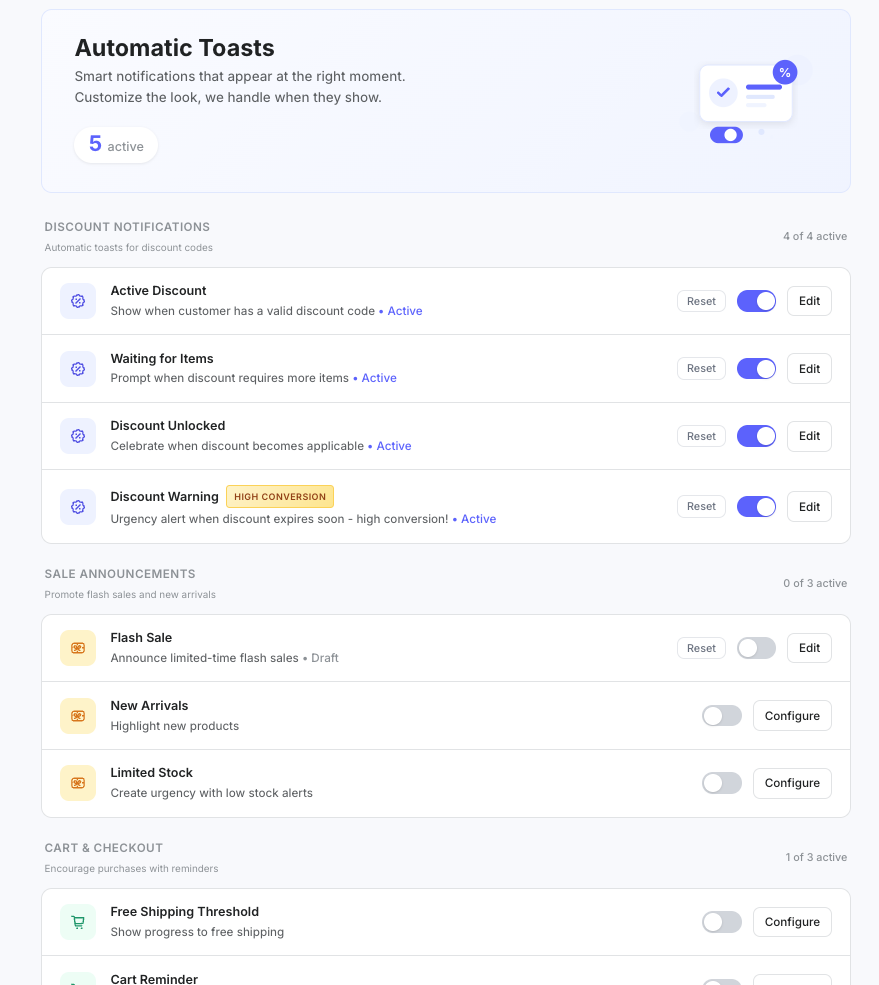
Sales toasts are small pop-up campaigns on your storefront: discounts, sales, cart nudges and engagement messages. In subZwallet you can start from 13 presets or build your own campaign, schedule it, choose what triggers it, target pages and Shopify markets, and give each visitor a unique discount code.
Preset categories
- **Discount**: active discount, waiting for items, discount unlocked, discount warning.
- **Sale**: flash sale, new arrivals, limited stock.
- **Cart**: free shipping threshold, cart reminder, exit intent.
- **Engagement**: welcome visitor, newsletter signup, returning customer.
Turn presets on or off without any design work, or open one in the editor to change it.
Campaigns
Campaigns are toasts you build yourself for launches, seasonal promotions or subscription offers. Each campaign has a status (draft, scheduled, active, paused or ended) and a schedule with start and end dates, or runs always on.
The toast editor
- **Layout**: nudge, action CTA, cart discount, announcement, promotion card or full banner.
- **Style**: looks such as glass, coupon, minimal or neon glow, in your brand colors.
- **Content**: headline, message and button.
- **Display rules**: what triggers the toast, which pages (all, chosen products or collections), how often a visitor sees it, and which markets.
- **Discount**: attach a discount, including a unique code for each visitor.
- **Position**: top or bottom, left, center or right.
How to set up a toast
- Open **Toasts** under Engage in the subZwallet sidebar.
- Switch on a preset, or create a campaign.
- In the editor, pick a layout and style and write short copy (it should be readable in a few seconds).
- Set the display rules: trigger, pages, frequency and markets.
- Add a discount if the toast promotes one.
- Set a schedule or leave it always on, then save and check it on your storefront.
Placement and timing tips
Position: bottom corners compete less with navigation and cookie banners than the top of the page. Delay: wait a few seconds after page load so the visitor can orient first; exit-intent toasts are the exception. Frequency: limit how often a visitor sees the same toast (for example once per session) so they do not learn to ignore it.
How subZwallet delivers toasts on your storefront
subZwallet adds toasts through a [Shopify theme app extension](https://shopify.dev/docs/apps/build/online-store/theme-app-extensions). App embeds work with Online Store 2.0 themes and can be switched on or off from the theme editor without touching code. To turn off all toasts at the Shopify level, go to Online Store > Themes > Customize > App embeds and switch off the subZwallet embed.
Next steps
Review your general notification preferences in [App settings](/help/app-settings), and see [Email templates](/help/email-templates) for the emails subscribers receive.